
Viral AI Digital Products Valentine’s Day Trends for Etsy in 2026
You only have a couple of weeks left to jump on the Valentine’s Day wave.
I know it feels early, because everyone’s still thinking about Christmas. But if you want to rank on Etsy, collect favorites, and be in position when buyers arrive, you need to start listing Valentine’s products right now.
This guide is all about AI-powered digital products:
- Digital prints
- Clipart
- Wall art
- Print-on-demand designs
I’ll walk you through:
- Which Valentine’s Day trends are already taking off for 2026
- How to research viral designs yourself
- How to recreate these styles with AI models like Nano Banana / Nano Banana Pro
- Where Kreatorium AI fits into your workflow
Why You Can’t Wait Until February
Etsy search rewards listings that:
- Have been live for a while
- Are already collecting favorites & add-to-carts
- Have a proven click-through and conversion rate
If you start uploading only once Valentine’s shoppers arrive, you’re competing with listings that already:
- Ranked
- Have SEO history
- Have social proof
The strategy is simple:
Post Valentine’s designs now, while everyone else is distracted by Christmas. Let your listings age, collect favorites, and be ready when the rush hits in 2026.
A Quick Note on AI & Digital Services
This post focuses on digital products (prints, clipart, wall art). But there’s a huge opportunity in digital services, too.
For example, using Nano Banana to:
- Combine two photos (like adding a loved one who passed into a new family photo)
- Charging $30+ per order for a custom, emotional service
If you want a full breakdown of Valentine’s-themed services you can run with Nano Banana inside Kreatorium AI, that can be its own deep dive. For now, let’s talk about the design trends.
The Tool I Use to Find Viral Valentine’s Trends
To spot trends early, I use Kreatorium AI – specifically the Etsy Research tool built inside it.
Inside Etsy Research you get:
- A “New & Hot” tab that scans digital + POD listings that:
- Were listed in the last 30 days
- Are already getting favorites, add-to-carts and sales quickly
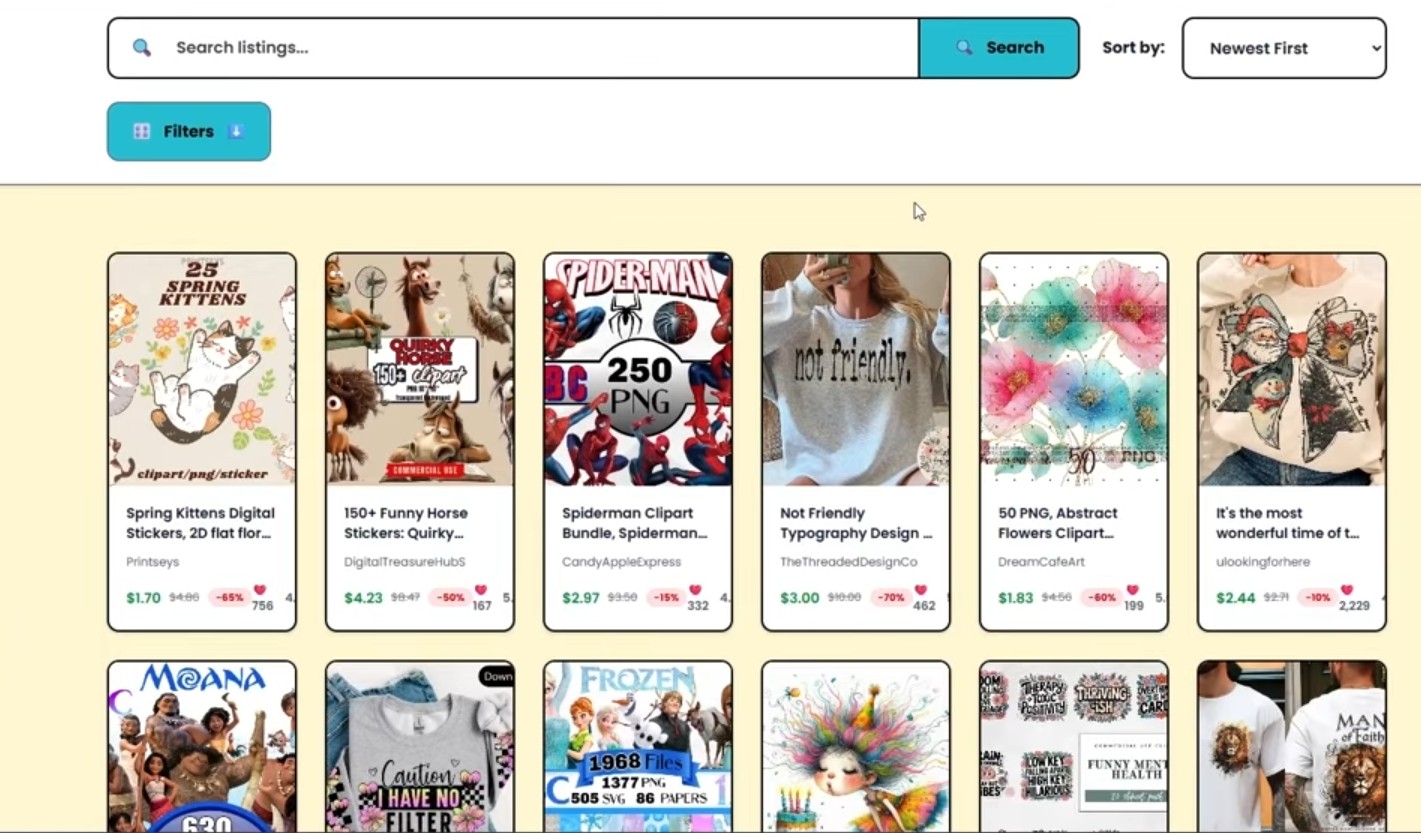
- Category filters like Clipart, Wall Art, etc.
- The ability to type in “Valentine’s” and instantly see what’s:
- Best-selling right now
- New but gaining momentum fast
Example: a Valentine’s design posted 5 days ago with only 8–10 favorites so far, but Etsy Research flags it because it’s moving faster than a typical new listing. Those are the designs you want to study and build on.
You can access this inside Kreatorium AI under Etsy Research → New & Hot.
Trend #1 – The Yarn / Latch-Hook Look (Now in Valentine’s Mode)
This started around Christmas:
- Designs that look like yarn, tufted rugs, latch-hook art or chenille patches
- Usually on sweatshirts and t-shirts
- Chunky, cozy, “stitched into the fabric” style
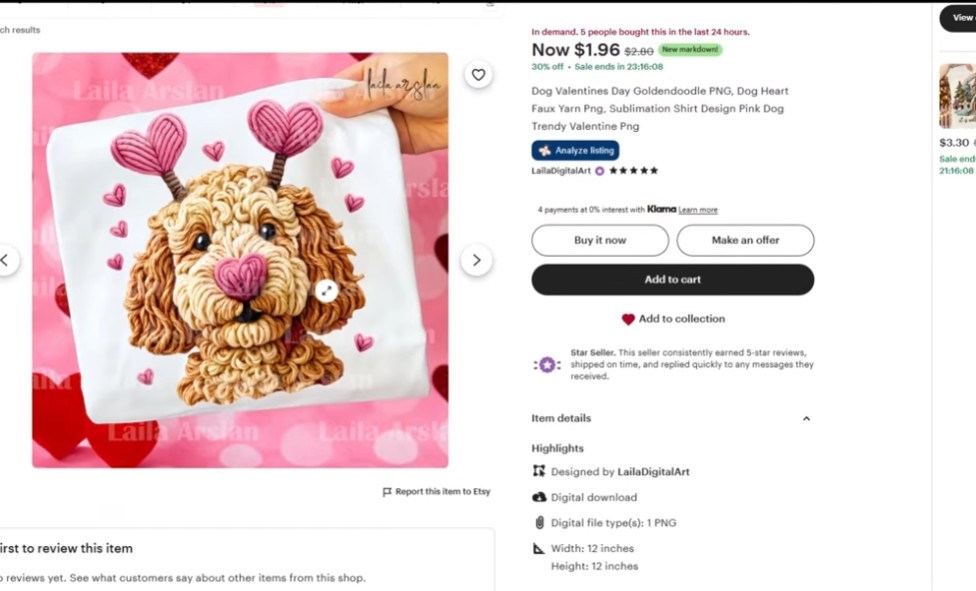
Now it’s being adapted to Valentine’s Day 2026:
- Hearts made of faux yarn
- “XO” or “X♥” designs in yarn
- Phrases like “Be Mine” in yarn style
Early yarn-based Valentine designs are already pulling in multiple sales per day — and there still aren’t that many of them.
Tips for the Yarn Trend
- Your mockup matters – it has to look like the yarn is really part of the fabric, not a flat sticker.
- Use close-up sweatshirt mockups that show texture.
- Test phrases like:
- Be Mine
- Love
- XOXO
- Mama, Bestie, etc. adapted to Valentine’s
Recreating Yarn Designs with AI
Inside Kreatorium AI:
- Open the AI Image Generator.
- Choose Nano Banana or Nano Banana Pro.
- Use a prompt like:
“Valentine’s sweatshirt graphic of the words ‘Be Mine’ in faux yarn / tufted rug style, soft shadows, realistic knitted texture, on pink background, high-resolution for print.” - Generate, then:
- Upscale if needed
- Drop onto a sweatshirt mockup
- Export for Etsy
Trend #2 – “Be Mine” Typography (Evergreen but Flexible)
“Be Mine” will never go out of style for Valentine’s. What changes each year is the style:
- Yarn / tufted style
- Brushstroke style
- Vintage, retro, bubbly text
- Minimalist serif text
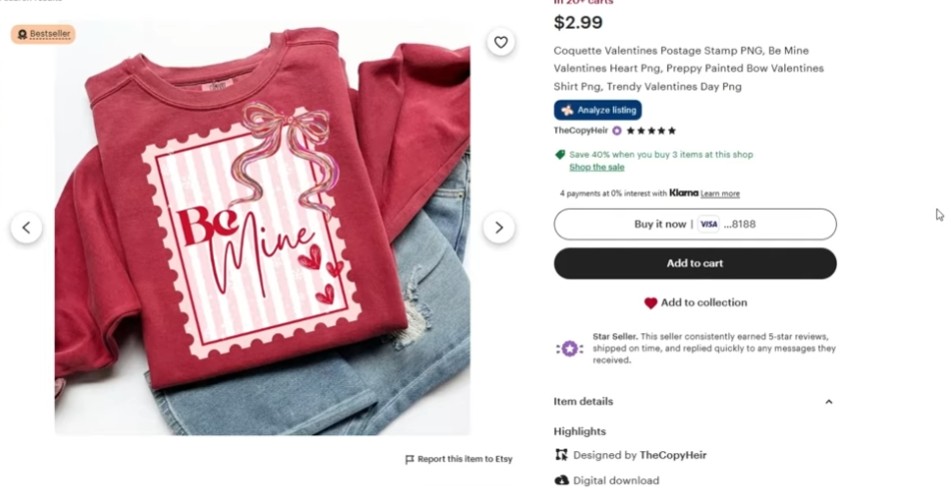
One smart seller:
- Shows one main “Be Mine” design in the thumbnail
- But the listing includes four variations inside
- The main image hooks the click; the extra variants boost perceived value and conversion
You can do the same with:
- Be Mine
- Be My Valentine
- Love You More
- Galentine’s Day, etc.
How Nano Banana Pro Helps
Use Nano Banana Pro to:
- Generate multiple layout concepts with the same phrase
- Vary color palettes (pink, red, cream, chocolate, etc.)
- Mix in subtle textures (glitter, yarn, fabric, brush strokes)
All your generations are saved automatically in your Kreatorium AI history so you can build bundles quickly.
Trend #3 – The “67” Kids Valentine Trend (Dumb… But Printing Money)
Let’s be honest: this trend is weird and kind of dumb.
But it’s selling.
You’ve probably seen it:
- Characters based on numbers like 6 and 7, with faces and hands
- Designs for kids’ shirts, classroom Valentine graphics, worksheets
- Variants for Christmas, school, and now Valentine’s Day
Some listings show over 10 purchases in the last 24 hours across different holidays. It might not be your personal taste, but kids love it, and parents buy it.
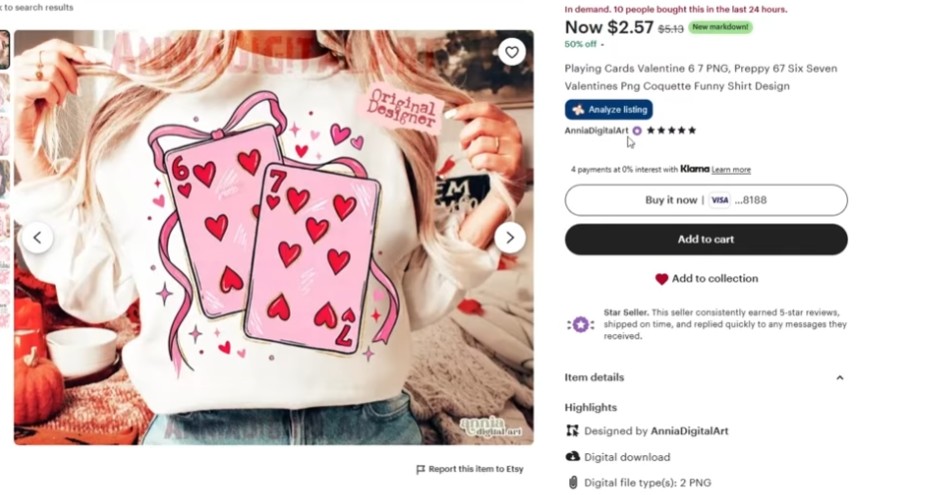
Cloning the Style with Nano Banana
Here’s exactly how you can recreate and customize this style inside Kreatorium AI:
- In Etsy Research, find a “67” design you like.
- Screenshot and crop just the graphic (no background).
- Upload that crop into the AI Image Generator.
- Use the “Get AI Prompt” feature to generate a base prompt from the reference.
- Clean the prompt:
- Remove any mention of “hands” if you don’t want them.
- Use Nano Banana or Nano Banana Pro to generate:
- New numbers (e.g., 14 for Feb 14, XO, LOL, coffee-themed, etc.)
- Variants in a similar style
You can also hit “Variants in Bulk” to generate multiple ideas at once, then pick the best ones. This is how you end up with:
- Numbers like 14
- Fun word combos like LOL, XO
- Coffee-themed hearts (coffee sells like crazy on Etsy)
You’re not copying the exact design – you’re using AI to learn the style and create your own twists.
Trend #4 – Whimsical Animals (Transferring from Christmas)
Whimsical animals have been huge for Thanksgiving & Christmas, and that energy is flowing straight into Valentine’s 2026.
You’ll see:
- Cute squirrels, bunnies, hedgehogs, raccoons, tigers, dogs, etc.
- Often holding heart-shaped balloons or heart-shaped nuts
- Soft painterly or storybook style
- Sold as clipart bundles (20+ images)
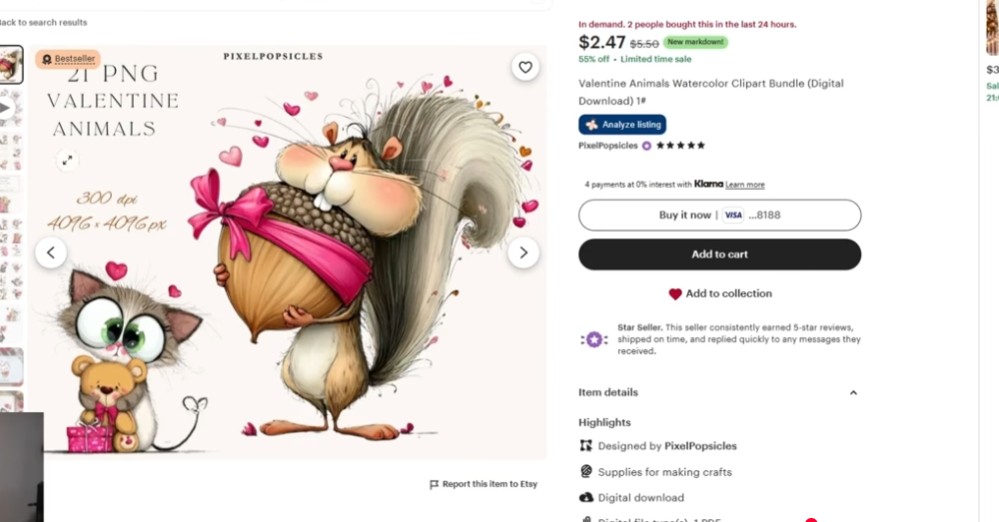
Examples from Etsy Research:
- A whimsical squirrel/heart bundle with 100+ favorites within days
- Clipart sets listed a day ago that already have 10+ favorites and 20+ add-to-carts
Why Clipart Sellers Should Lean Into This
- Whimsical style is evergreen – you can use it for:
- Valentine’s Day
- Christmas
- Easter
- Mother’s Day, birthdays, etc.
- Buyers use these for:
- Printables
- Cards
- DIY crafts
- School projects
Building Whimsical Animals with Nano Banana Pro
In Kreatorium AI:
- Open Nano Banana Pro.
- Use a prompt like:
“Whimsical illustration of a cute hedgehog holding a heart-shaped balloon, soft watercolor style, pastel pink background, isolated on transparent background, high-resolution clipart.” - Generate sets:
- Hedgehog, bunny, squirrel, raccoon, dog, cat, tiger, etc.
- Bundle 20–30 images into one Valentine’s clipart pack.
You can rinse-and-repeat this formula for multiple holidays across 2026.
Trend #5 – Whimsical Floral Hearts
Floral is always an Etsy staple. The twist for this season: whimsical floral hearts.
Think:
- Heart shapes made entirely of flowers, leaves, and berries
- Soft, dreamy, whimsical look
- Sold as clipart sets (20+ designs)
New listings are already getting strong early metrics — favorites and add-to-carts within the first couple of days.
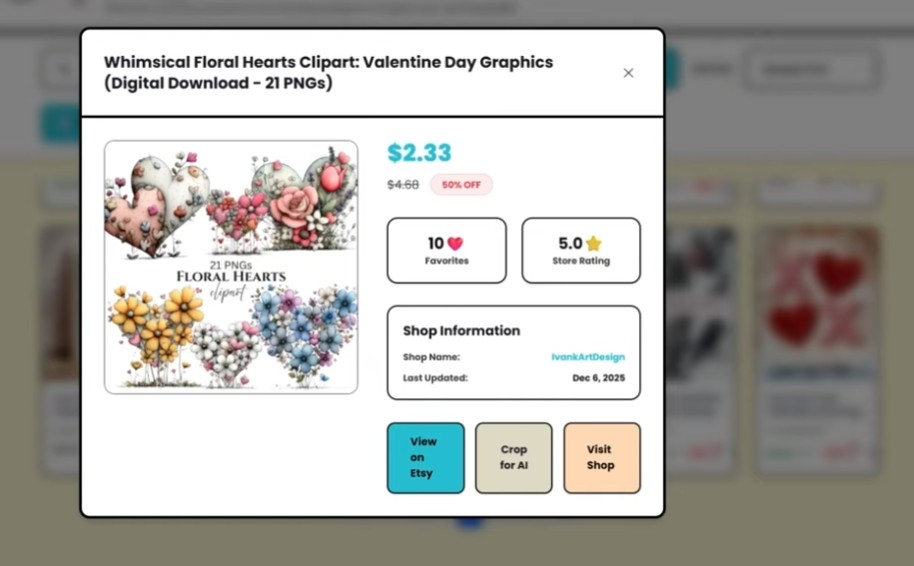
How to Build Floral Heart Sets
Use Nano Banana Pro prompts like:
“Whimsical floral heart made of roses, wildflowers, and leaves, soft watercolor style, pastel pink and cream palette, isolated on transparent background, high-resolution clipart.”
Generate:
- 20+ variations with different flowers, palettes, and arrangements
- A few darker / moodier versions for variety
Floral will continue into summer, so your designs have life beyond Valentine’s Day.
Trend #6 – Text-Based Wall Art with a Twist (UNO “Love You More”)
For wall art sellers, there’s a clean, clever trend:
- Simple text concepts + recognizable pop-culture objects
Example: “Love You More” using an UNO swap card illustration.
Designs like this are already showing:
- Dozens of carts
- Consistent sales as Valentine’s gets closer
It’s not “viral” yet – but wall art moves slower, and this style has long-term potential.
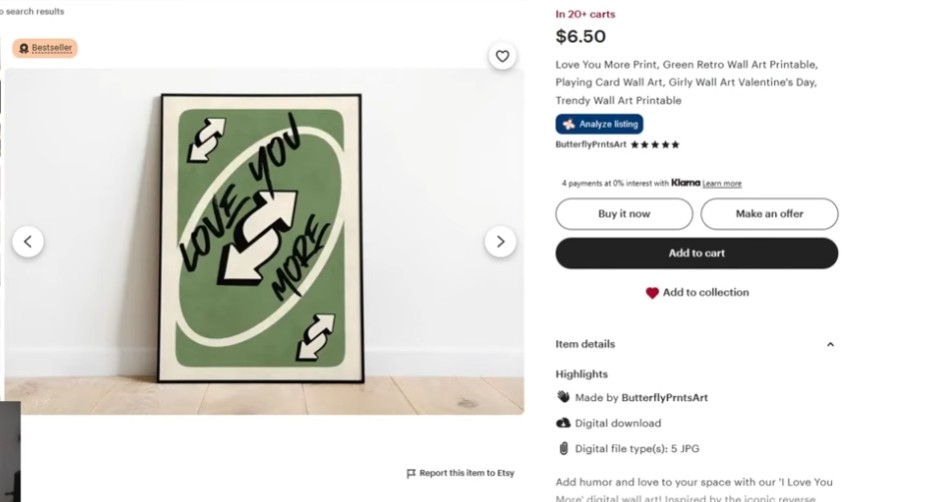
How to Create These with Nano Banana Pro
Prompt idea inside Kreatorium AI:
“Minimalist wall art illustration of an UNO swap card with the words ‘Love You More’ beneath it, clean vector style, beige background, suitable for printable wall art.”
You can do this for:
- Board games
- Coffee lovers
- Music themes
- Inside jokes between couples
The key is recognition + sentiment.
How to Research Your Own Valentine’s Trends With Kreatorium AI
Here’s the process you can copy:
- Open Etsy Research inside Kreatorium AI.
- Go to the New & Hot tab.
- Filter for:
- Digital or Print-on-demand
- Categories like Clipart or Wall Art if you want to niche down
- Type in keywords like:
valentineloveheart
- Look for designs that:
- Were listed in the last 30 days
- Have:
- 8–10+ favorites
- 20+ add-to-carts
- Or “X purchases in the last 24 hours”
Those are your early signals.
From there:
- Save examples
- Study the styles, phrases, formats
- Use Nano Banana / Nano Banana Pro to generate your own versions and bundles
Don’t Sleep on Valentine’s Digital Services (Nano Banana Use Case)
There’s a whole other lane: digital services with AI.
For example:
A service where you combine a photo of a passed loved one with a modern portrait (partner, child, grandchild) using Nano Banana — and charge $30+ per order.
You can offer upsells like:
- Extra people added to the image
- Both color and black-and-white versions
- Print-ready high-resolution files
If you want a full Valentine’s service-based breakdown using Nano Banana Pro inside Kreatorium AI, that can easily be another deep guide.
Try Kreatorium AI (With Nano Banana Inside)
If you want to shortcut a lot of this work and ride the Valentine’s Day 2026 wave:
- See what’s trending on Etsy in real time
- Generate Valentine’s clipart, wall art, and shirt designs
- Upscale, remove backgrounds, and store your image history
- Experiment with Nano Banana & Nano Banana Pro for all the styles above
…you can do it all inside Kreatorium AI.
You also get:
- Weekly community calls
- Etsy strategy discussions
- New model & trend breakdowns throughout 2026
Get your Valentine’s designs live now, let them age and pick up momentum, and you’ll thank yourself when the rush hits.
Start designing today, not in February.